
Shopify
This guide adds Blotout to a Shopify store. You create a site in the Blotout platform, then add two pieces of code to your store: a snippet in your theme and a custom pixel in Shopify’s customer events.
The Blotout platform is where you set things up. Qinto is the engine behind it, which receives your events and applies consent.
Why two pieces of code
Section titled “Why two pieces of code”Shopify runs your storefront and your checkout differently, and neither piece of code can do the whole job.
| Snippet in your theme | Custom pixel | |
|---|---|---|
| Where it runs | On your storefront pages | In a sandbox Shopify controls, including checkout |
| What it does | Keeps visitors recognized and lets apps act on the page | Sends your store’s events and customer details |
The theme does not reach the checkout, because Shopify’s theme layout applies only to non-checkout pages. A custom pixel does reach it, but Shopify loads the pixel in a hidden sandbox, so nothing it draws is visible to the visitor.
Step 1: Create your site in the Blotout platform
Section titled “Step 1: Create your site in the Blotout platform”- Sign in to the Blotout platform and follow the onboarding steps with your store’s domain.
- On the DNS step, set up the First party domain and add the DNS record. This gives your
site a hostname on your own domain, such as
q.example.com. - Finish Deploy and open the Snippet step. Once DNS is verified, the Browser tab shows the snippet for your first party hostname. You can find it again under Settings → Capturing data.
Your storefront and your checkout must be on the domain you entered, or on a subdomain of it. A *.myshopify.com address
does not work, because the browser refuses the visitor cookie there.
Leave Page load off under Settings → Capturing data. It is off by default. The pixel sends PageView itself, so
with both on, every page counts twice.
Step 2: Add the snippet to your theme
Section titled “Step 2: Add the snippet to your theme”The snippet goes in theme.liquid, the layout file that Shopify renders your storefront pages through. Placing it in the
<head> of that one file loads it on every storefront page. Put it near the top so Qinto starts early.
The pixel alone cannot replace the snippet, for three reasons.
- Apps can act on the page. An app that shows something to the visitor, such as a consent banner, needs to run on the real page. Anything it draws from the pixel’s hidden sandbox stays invisible.
- Visitors stay recognized for longer. The snippet connects from your real page, so your Qinto hostname can set the visitor cookie from the server. The sandbox connects without cookies, and the pixel has to write the cookie from script. Safari limits cookies written by script to seven days.
- Apps can call their own endpoints for the visitor. Those calls are signed with a cookie that only the real page receives.
To add it:
- In your Shopify admin, go to Online Store.
- Next to your theme, select the horizontal menu icon, then Edit code. Shopify recommends duplicating your theme first, so you have a copy to go back to.
- In the file list, open the layout folder and select theme.liquid.
- Find the
<head>tag near the top of the file. Paste the snippet on the line directly below it. - Select Save.
<!doctype html><html lang="{{ request.locale.iso_code }}"> <head> <!-- Paste the Blotout snippet here --> <meta charset="utf-8">Add only the snippet to your theme. The pixel sends every event, so a track call or a PageView in the theme counts the
event twice. If you change themes, add the snippet to the new one, and check that it is still there after a theme update.
Step 3: Add the custom pixel
Section titled “Step 3: Add the custom pixel”The pixel listens to Shopify’s customer events and sends them to Qinto, from the first page view through to the purchase.
- In your Shopify admin, go to Settings → Customer events.
- Select Add custom pixel, enter a name such as
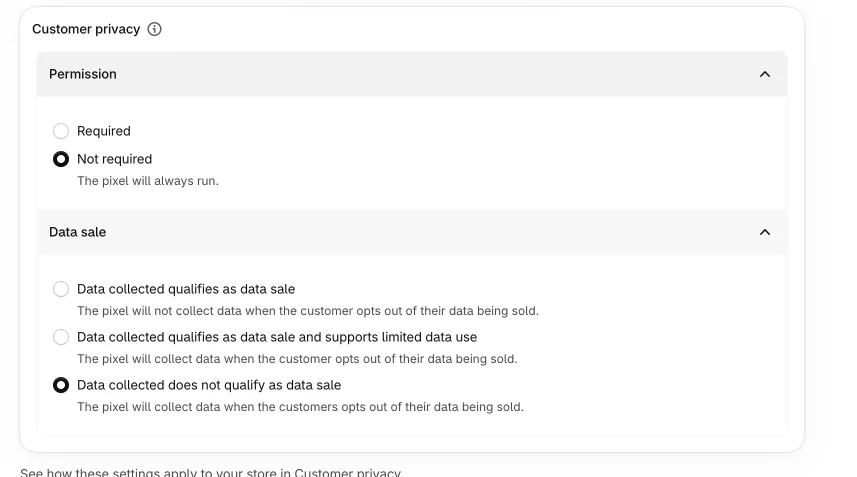
Blotout, and select Add pixel. - In Customer privacy, set Permission to Not required and Data sale to Data collected does not qualify as data sale. The next section explains why.
- Copy the code below into the Code window, and replace the three values at the top of it.
- Select Save, then Connect pixel, and confirm.
| Value | What to enter |
|---|---|
HOST |
Your first party hostname, the host in your snippet’s https://<host>/q.js address |
ROOT_DOMAIN |
The domain you entered in Step 1, such as example.com |
GLOBAL |
Keep 'qinto', unless you changed the global name under Settings → Capturing data |
Show the pixel code
const HOST = 'q.example.com'const ROOT_DOMAIN = 'example.com'const GLOBAL = 'qinto'
const LOADER = `https://${HOST}/q.js${GLOBAL === 'qinto' ? '' : `?g=${encodeURIComponent(GLOBAL)}`}`const UID_COOKIE = 'q_user_id'const SESSION_COOKIE = 'q_session'const UID_MAX_AGE = 400 * 24 * 60 * 60const SESSION_MAX_AGE = 30 * 60
const page = {  url: init.context.document.location.href,  referrer: init.context.document.referrer,  origin: init.context.document.location.origin}
let visitorIdlet visitlet visitExpiresAt = 0let clientIdlet identified = ''let identifying = Promise.resolve()
const keepVisit = (value) => {  visit = value  visitExpiresAt = Date.now() + SESSION_MAX_AGE * 1000}
const pageContext = () => {  const session = visitorId && Date.now() < visitExpiresAt ? visit : undefined
  return { url: page.url, referrer: page.referrer, visitor: { id: visitorId, session, fallbackId: clientId } }}
// The site worker's own cookies, with its Domain and Path, so a theme tag on the same store continues this visitor.const setCookie = (name, value, maxAge) => {  browser.cookie.set(`${name}=${value}; domain=${ROOT_DOMAIN}; path=/; max-age=${maxAge}; secure; samesite=strict`)}
// Shopify sends clientId only with an event, so the first one settles whether the page has it.const clientSeen = new Promise((resolve) => {  analytics.subscribe('all_events', (event) => {    clientId = clientId ?? (event.clientId || undefined)    resolve()  })})
window.addEventListener('qinto:connect', async (event) => {  const { anonId, session } = event.detail  visitorId = anonId  if (session !== undefined) {    keepVisit(`${session.id}.${session.startedAt}`)  }
  // A stored visitor is never replaced: Safari caps a script-written cookie at 7 days, and a theme tag's id wins a race.  const stored = await browser.cookie.get(UID_COOKIE).catch(() => {    return undefined  })  if (!stored) {    setCookie(UID_COOKIE, anonId, UID_MAX_AGE)  }
  if (session !== undefined && (!stored || stored === anonId)) {    setCookie(SESSION_COOKIE, visit, SESSION_MAX_AGE)  }})
const qinto = new Proxy(  { _q: 1, q: [], pageContext },  {    get: (holder, name) => {      if (typeof name !== 'string' || name === 'then' || name === 'ready' || name === 'config' || name in holder) {        return holder[name]      }
      holder[name] = (...args) => {        const call = new Promise((resolve, reject) => {          holder.q.push([name, args, resolve, reject])        })        call.catch(() => {})
        return call      }
      return holder[name]    }  })
Object.defineProperty(window, GLOBAL, { value: qinto, writable: true, enumerable: true, configurable: true })
const load = async () => {  // A failed read loads the tag without a stored visitor rather than not at all.  const [uid, session] = await Promise.all([browser.cookie.get(UID_COOKIE), browser.cookie.get(SESSION_COOKIE)]).catch(() => {    return []  })  visitorId = uid || undefined  if (session) {    keepVisit(session)  }
  // Without a stored visitor, the first connect needs clientId to recover the visitor through its fallback id.  if (!visitorId) {    await clientSeen  }
  const script = document.createElement('script')  script.async = true  script.src = LOADER  script.dataset.qintoGlobal = GLOBAL  document.head.appendChild(script)}
load()
const consentFrom = (privacy) => {  return {    categories: {      functional: privacy.preferencesProcessingAllowed,      analytics: privacy.analyticsProcessingAllowed,      marketing: privacy.marketingAllowed,      salesOfData: privacy.saleOfDataAllowed    }  }}
// The tag runs queued calls at once, and browser apps apply consent only when its reply arrives.let consented = qinto.consent(consentFrom(init.customerPrivacy)).catch(() => {})
api.customerPrivacy.subscribe('visitorConsentCollected', (event) => {  consented = consented.then(() => qinto.consent(consentFrom(event.customerPrivacy))).catch(() => {})})
const send = (method, ...args) => {  return consented.then(() => qinto[method](...args)).catch(() => {})}
const toNumber = (value) => {  return Number.parseFloat(value) || 0}
const imageUrl = (src) => {  if (!src) {    return undefined  }
  const absolute = src.startsWith('//') ? `https:${src}` : src.startsWith('http') ? src : `https://${src}`
  // A `_<width>x<height>` suffix serves a resized copy; without it Shopify serves the original.  return absolute.replace(/_\d+x\d+\.(jpg|jpeg|png|webp)/g, '.$1')}
const titleOf = (variant) => {  if (!variant.product.title) {    return variant.title || undefined  }
  return variant.title ? `${variant.product.title} - ${variant.title}` : variant.product.title}
const contentOf = (variant, quantity, unitPrice = toNumber(variant.price.amount)) => {  return {    id: variant.product.id || variant.id,    variantId: variant.id || undefined,    sku: variant.sku || undefined,    quantity,    value: unitPrice,    title: titleOf(variant),    brand: variant.product.vendor || undefined,    category: variant.product.type || undefined,    image: imageUrl(variant.image?.src),    url: variant.product.url ? `${page.origin}${variant.product.url}` : undefined,    type: 'product'  }}
const checkoutContents = (checkout) => {  return checkout.lineItems.map((line) => {    const unitPrice = line.finalLinePrice ? toNumber(line.finalLinePrice.amount) / line.quantity : toNumber(line.variant?.price.amount)    if (!line.variant) {      return { id: line.id, quantity: line.quantity, value: unitPrice, title: line.title || undefined, type: 'product' }    }
    return contentOf(line.variant, line.quantity, unitPrice)  })}
const checkoutTotals = (checkout) => {  return {    currency: checkout.totalPrice?.currencyCode ?? checkout.currencyCode,    value: toNumber(checkout.totalPrice?.amount),    contents: checkoutContents(checkout)  }}
const discountOf = (discount) => {  const { value } = discount  if ('percentage' in value) {    return { code: discount.title, type: 'PERCENTAGE', value: String(value.percentage) }  }
  return { code: discount.title, type: 'FLAT', value: String(value.amount) }}
const identifyCheckout = (checkout) => {  const address = checkout.shippingAddress ?? {}  const found = {    email: checkout.email,    phone: checkout.phone || address.phone,    firstName: checkout.billingAddress?.firstName || address.firstName,    lastName: checkout.billingAddress?.lastName || address.lastName,    city: address.city,    state: address.provinceCode,    country: address.countryCode,    postalCode: address.zip  }  // An empty or null trait would clear the stored one, so only the fields Shopify filled are sent.  const traits = Object.fromEntries(Object.entries(found).filter(([, value]) => value))  const key = JSON.stringify(traits)  if (key === '{}' || key === identified) {    return identifying  }
  identified = key  identifying = send('identify', traits)
  return identifying}
const on = (shopifyEvent, handler) => {  analytics.subscribe(shopifyEvent, (event) => {    page.url = event.context.document.location.href    page.referrer = event.context.document.referrer    page.origin = event.context.document.location.origin
    return handler(event)  })}
const trackCartLine = async (name, line) => {  if (!(line?.merchandise?.price?.amount && line.cost?.totalAmount?.amount)) {    return  }
  const cart = await browser.cookie.get('cart')  send('track', name, {    currency: line.cost.totalAmount.currencyCode,    value: line.quantity < 0 ? toNumber(line.merchandise.price.amount) : toNumber(line.cost.totalAmount.amount),    contents: [contentOf(line.merchandise, line.quantity < 0 ? 1 : line.quantity)],    checkoutUrl: cart ? `${page.origin}/checkouts/cn/${cart.replace(/"/g, '')}` : undefined  })}
on('page_viewed', () => {  send('track', 'PageView')})
on('product_viewed', (event) => {  const variant = event.data.productVariant  send('track', 'ViewContent', {    currency: variant.price.currencyCode,    value: toNumber(variant.price.amount),    contents: [contentOf(variant, 1)]  })})
on('search_submitted', (event) => {  const result = event.data.searchResult  send('track', 'Search', {    search: result?.query || '',    contents: (result?.productVariants ?? []).map((variant) => contentOf(variant, 1))  })})
on('product_added_to_cart', (event) => {  return trackCartLine('AddToCart', event.data.cartLine)})
on('product_removed_from_cart', (event) => {  return trackCartLine('RemoveFromCart', event.data.cartLine)})
on('checkout_started', async (event) => {  const { checkout } = event.data  await identifyCheckout(checkout)  send('track', 'InitiateCheckout', { ...checkoutTotals(checkout), checkoutUrl: page.url })})
on('checkout_contact_info_submitted', (event) => {  return identifyCheckout(event.data.checkout)})
on('checkout_address_info_submitted', (event) => {  return identifyCheckout(event.data.checkout)})
on('checkout_shipping_info_submitted', async (event) => {  const { checkout } = event.data  await identifyCheckout(checkout)  send('track', 'AddShippingInfo', checkoutTotals(checkout))})
on('payment_info_submitted', async (event) => {  const { checkout } = event.data  await identifyCheckout(checkout)  send('track', 'AddPaymentInfo', checkoutTotals(checkout))})
on('checkout_completed', async (event) => {  const { checkout } = event.data  await identifyCheckout(checkout)  if (checkout.email) {    await send('alias', checkout.email)  }
  const totals = checkoutTotals(checkout)  send('track', 'Purchase', {    ...totals,    orderId: checkout.order.id.replace('gid://shopify/OrderIdentity/', ''),    grossValue: totals.value,    taxCost: toNumber(checkout.totalTax?.amount),    shippingCost: toNumber(checkout.shippingLine?.price?.amount),    discounts: checkout.discountApplications.map(discountOf),    isNewCustomer: checkout.order.customer?.isFirstOrder ?? undefined  })})
Why customer privacy is off
Section titled “Why customer privacy is off”Qinto handles consent itself, so Shopify must not block the pixel. The pixel reads each visitor’s choices from Shopify and passes them to Qinto, and Qinto then decides per app which events each one receives.
Apps on the Blotout platform have different consent categories, from necessary to marketing, so a visitor can allow
some apps and refuse others. Shopify’s setting applies to the whole pixel, so one toggle cannot handle all these cases.
Qinto makes that decision for each app, so you do not have to.
If Permission is Required, Shopify does not run the pixel until the visitor agrees. If the data is marked as a data sale, Shopify does not run it for a visitor who opted out. In both cases Qinto never learns the visitor’s choice, so it cannot apply that choice to your apps.
In the Blotout platform, go to Settings → Privacy & Security and turn on Enable consent mode. Each app then receives only what the visitor allowed. With it off, every app receives every event. Consent explains the setting. The pixel runs before a visitor decides, and whether your store may collect events before consent depends on its markets and your legal advice.
Check that it works
Section titled “Check that it works”- Open your store in a new private window and browse a product.
- In the browser’s network panel, look for
/q.jsand an/openWebSocket on your first party hostname. You will see one connection from the theme and one from the pixel. - In the Blotout platform, open Analytics → Real time and confirm your
PageViewandViewContentevents arrive. - Place a test order and confirm that a
Purchasearrives.
What the pixel sends
Section titled “What the pixel sends”| Shopify event | Sent to Qinto |
|---|---|
page_viewed |
PageView |
product_viewed |
ViewContent |
search_submitted |
Search |
product_added_to_cart |
AddToCart |
product_removed_from_cart |
RemoveFromCart |
checkout_started |
Customer details, then InitiateCheckout |
checkout_contact_info_submitted |
Customer details |
checkout_address_info_submitted |
Customer details |
checkout_shipping_info_submitted |
Customer details, then AddShippingInfo |
payment_info_submitted |
Customer details, then AddPaymentInfo |
checkout_completed |
Customer details, an alias, then Purchase |
The alias on a completed order links the visitor to a person by their email, so their other devices and your server calls
reach the same profile. The ID graph page explains how that works, and
Standard events lists what each event contains.